ip
Rafayel User Guide
“The world is full of things that can swallow you whole if you let them. An anchor needs to be found.”
Rafayel will help free your mind from remembering every little task. It’s designed to be simple, efficient and fast, so you can focus on what truly matters. Rafayel will remind you of overdue tasks and upcoming deadlines, ensuring you never miss important commitments.
Overview
Quick Start
- Ensure you have Java 11 or above installed.
- Download the latest version of
rafayel.jarfrom here. - Copy the file to the folder you want to use as the home folder for Rafayel.
- Open a command terminal, navigate to the folder, and run
java -jar rafayel.jar. - Type a command and press Enter to execute it. Some examples you can try:
list: Lists all tasks loaded from local storage.todo borrow book: Creates a Todo task.deadline return book /by 01-12-2024 18:00: Creates a Deadline task.mark 1: Marks the first task as done.delete 1: Deletes the first task.remind: Find out what tasks are due soon or overdue.
- Refer to the Features section below for details of all available commands.
Features
Adding a Todo Task: TODO
Adds a simple todo task without any date/time.
Format: todo DESCRIPTION
Example: todo borrow book
Very well. I've graciously added this new stroke to our canvas:

 『 [T][ ] borrow book 』

Now our collection holds 4 priceless pieces. Try not to clutter my masterpiece, alright?
Adding a Deadline: DEADLINE
Adds a task with a specific due date.
Format: deadline DESCRIPTION /by YYYY-MM-DD HH:mm
Example: deadline return book /by 2024-12-01 18:00
Very well. I've graciously added this new stroke to our canvas:

 『 [D][ ] return book (by: Dec 1 2024 18:00) 』

Now our collection holds 4 priceless pieces. Try not to clutter my masterpiece, alright?
Adding an Event: EVENT
Adds a task with a start and end date/time.
Format: event DESCRIPTION /from YYYY-MM-DD HH:mm /to YYYY-MM-DD HH:mm
Example: event project meeting /from 2024-12-01 14:00 /to 2024-12-01 18:00
Very well. I've graciously added this new stroke to our canvas:

 『 [E][ ] project meeting (from: Dec 1 2024 14:00 to: Dec 1 2024 18:00) 』

Now our collection holds 4 priceless pieces. Try not to clutter my masterpiece, alright?
Listing All Tasks: LIST
Displays all tasks in your list with their current status.
Format: list
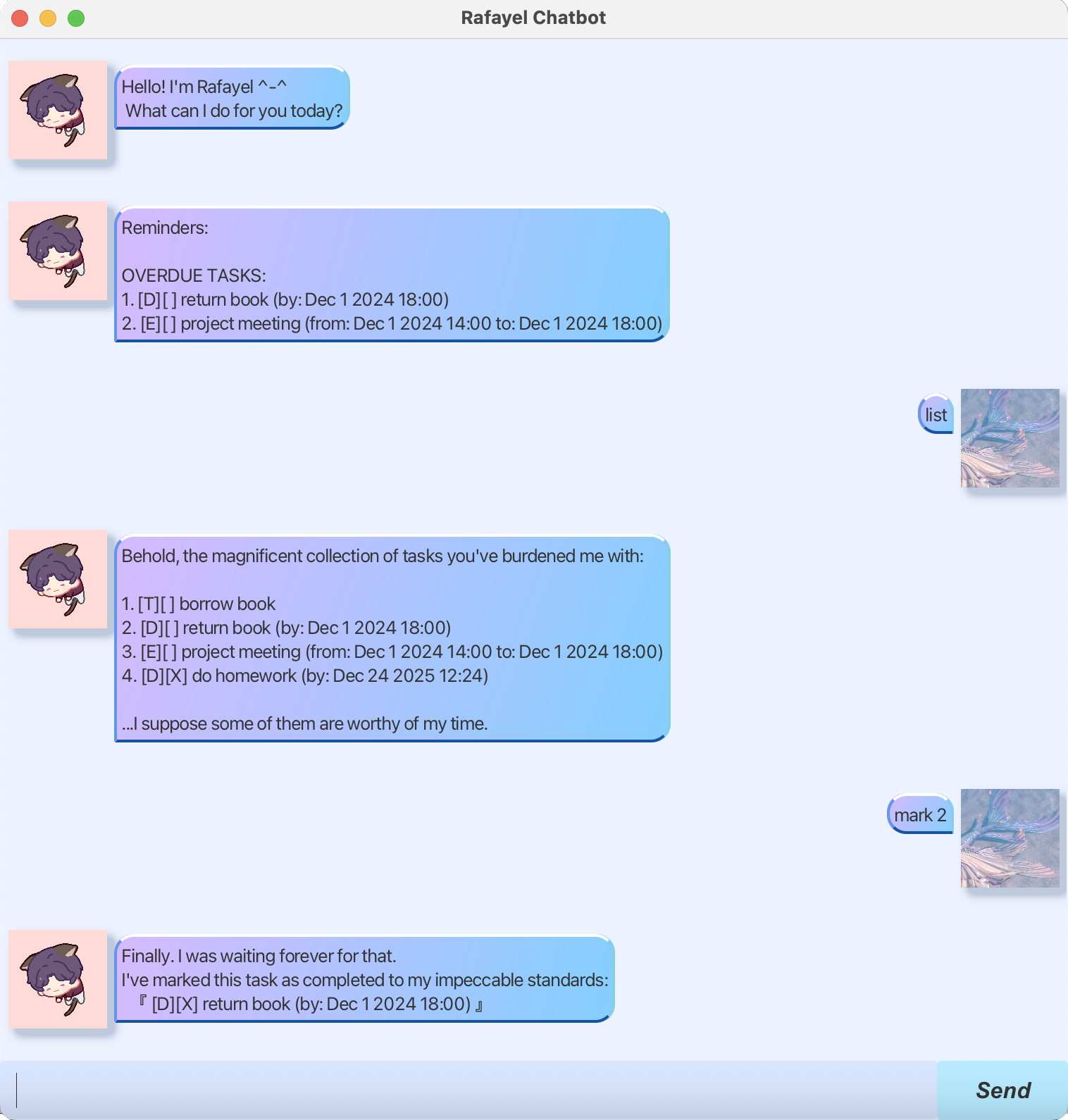
Behold, the magnificent collection of tasks you've burdened me with:

1. [T][ ] borrow book
2. [D][ ] return book (by: Dec 1 2024 18:00)
3. [E][ ] project meeting (from: Dec 1 2024 14:00 to: Dec 1 2024 18:00)
4. [D][X] do homework (by: Dec 24 2025 12:24)

...I suppose some of them are worthy of my time.
Marking a Task as Done: MARK
Marks a specific task as completed.
Format: mark TASK_NUMBER
Example: mark 2
Finally, I was waiting forever for that.
I've marked this task as completed to my impeccable standards:
『[D][X] return book (by: Dec 1 2024 18:00)』
Unmarking a Task: UNMARK
Marks a completed task as not done yet.
Format: unmark TASK_NUMBER
Example: unmark 4
Hm, I'll trust you have a good reason for this delay.
I've marked this task as regrettably left unfinished:
『[D][ ] do homework (by: Dec 24 2025 12:24)』
Deleting a Task: DELETE
Removes a task from your list.
Format: delete TASK_NUMBER
Example: delete 1
Okay, I've removed this task from our gallery:
 『 [T][ ] borrow book 』
We are now left with 3 tasks. A more curated collection, I suppose.
Finding Tasks: FIND
Searches for tasks containing a specific keyword.
Format: find KEYWORD
Example: find book
After sifting through the sands of your endless list, I found these. You owe me:
 1. [D][X] return book (by: Dec 1 2024 18:00)
Getting Reminders: REMIND
Shows overdue tasks and tasks due in the next 24 hours.
Format: remind
Reminders:

OVERDUE TASKS:
 1. [D][ ] return book (by: Dec 1 2024 18:00)
 2. [E][ ] project meeting (from: Dec 1 2024 14:00 to: Dec 1 2024 18:00)
Exiting the Program: BYE
Saves all tasks and exits the application.
Format: bye
Bye, come back soon, don't make me wait too long .-.
Automatic Reminders
Rafayel will automatically show you reminders of overdue tasks and upcoming deadlines (within 24 hours) each time you start the application as well as every 5 minutes afterwards, ensuring you’re always aware of your most pressing commitments.
Saving the Data
Rafayel automatically saves your tasks to a local file after every command. The data is stored in the same folder as the application in a folder named data and the file is named rafayel.txt. There’s no need to manually save your data.
FAQ
Q: What date/time format should I use? A: Rafayel is flexible! It accepts the following formats:
yyyy/MM/dd HH:mm(e.g.,2024/12/01 18:00)dd-MM-yyyy HH:mm(e.g.,01-12-2024 18:00)MMM d yyyy HH:mm(e.g.,Dec 1 2024 18:00)
Command Summary
| Command | Format | Example |
|---|---|---|
| List | list |
list |
| Todo | todo DESCRIPTION |
todo read book |
| Deadline | deadline DESCRIPTION /by DATE |
deadline assignment /by 2025-12-05 23:59 |
| Event | event DESCRIPTION /from DATE /to DATE |
event concert /from 01-12-2025 14:00 /to 01-12-2025 18:00 |
| Mark | mark TASK_NUMBER |
mark 3 |
| Unmark | unmark TASK_NUMBER |
unmark 3 |
| Delete | delete TASK_NUMBER |
delete 3 |
| Find | find KEYWORD |
find book |
| Remind | remind |
remind |
| Exit | bye |
bye |